Twilio A2P / 10DLC evidence
Visual proof of every PlayerDesk account-security SMS flow.
This page is a public reviewer walkthrough for the PlayerDesk Member Authentication SMS program. It shows the exact legal disclosures, consent copy, and representative UI states for the account-security, SMS 2FA, and phone-verification flows tied to this campaign.
PlayerDesk is a DBA of Flying Banana Productions LLC.
Evidence page
http://www.playerdesk.net/compliance/a2p-member-authPrivacy Policy
http://www.playerdesk.net/privacyTerms of Service
http://www.playerdesk.net/termsUse case
LOW_VOLUME
Description
Flying Banana Productions LLC, which does business as PlayerDesk, sends low-volume service-related text messages to members using our platform. Messages include account signup verification codes, sign-in codes, SMS 2FA codes, and phone verification codes sent to help recipients access and secure their accounts.
`message_flow`
Recurring opt-in occurs on protected PlayerDesk website screens after invitation acceptance and inside authenticated account settings. Because those consent screens require either a valid invitation or an authenticated session, public reviewer evidence is hosted at http://www.playerdesk.net/compliance/a2p-member-auth. In both recurring opt-in flows, the member enters a mobile phone number, directly requests a one-time phone verification code by SMS, enters the code to verify phone ownership, reviews the SMS disclosure with links to http://www.playerdesk.net/privacy and http://www.playerdesk.net/terms, actively checks an unchecked consent box, and taps Enable SMS. These recurring opt-in paths are available (1) after a member accepts an email invitation and (2) in authenticated account settings, and they enable ongoing SMS sign-in and SMS 2FA. PlayerDesk also sends one-time SMS only when the user directly requests or triggers a signup, login, SMS 2FA, or phone-verification flow in the product. Message frequency varies. Message and data rates may apply. HELP and STOP are supported. PlayerDesk does not offer first-time keyword opt-in by text; START only re-enables delivery after STOP.
`message_samples`
Your PlayerDesk signup code is: [code]. This code expires in 10 min. Reply HELP for help, STOP to opt out.
Your PlayerDesk login code is: [code]. This code expires in 10 min. Reply HELP for help, STOP to opt out.
Your PlayerDesk 2FA code is: [code]. This code expires in 10 min. Reply HELP for help, STOP to opt out.
Your PlayerDesk phone verification code is: [code]. This code expires in 10 min. Reply HELP for help, STOP to opt out.
`opt_in_keywords` / `opt_in_message`
START
PlayerDesk: SMS delivery is re-enabled for this number. Msg frequency varies. Msg & data rates may apply. Reply HELP for help, STOP to opt out.
`help_keywords` / `help_message`
HELP, INFO
PlayerDesk: Texts include signup, login, SMS 2FA, and phone verification messages. Msg & data rates may apply. Reply STOP to opt out. Help: support@playerdesk.net.
`opt_out_keywords` / `opt_out_message`
OPTOUT, CANCEL, END, QUIT, UNSUBSCRIBE, REVOKE, STOP, STOPALL
PlayerDesk: You have successfully unsubscribed and will no longer receive PlayerDesk text messages from this number. Reply START to re-enable SMS.
Program
Program scope and required disclosures
These statements are the canonical compliance copy used across the website, legal pages, and member consent surfaces.
Message and data rates may apply.
Reply STOP to unsubscribe from PlayerDesk text messages from this number at any time. A one-time confirmation message may be sent after you opt out.
Reply HELP for help or email support@playerdesk.net.
By checking this box and providing your phone number, you agree to receive recurring automated account-security text messages from PlayerDesk at the number provided, including account signup verification codes, sign-in codes, SMS 2FA codes, and phone verification codes. Consent is not a condition of any purchase. Message frequency varies based on how often you sign up, sign in, complete SMS 2FA, or verify your phone number. Message and data rates may apply. Reply STOP to unsubscribe at any time, or HELP for help. See our Privacy Policy (/privacy) and Terms of Service (/terms) for details.
Account signup verification codes
One-time codes sent when a user starts phone-based account creation.
Account sign-in codes
One-time codes sent during SMS login for eligible members.
SMS 2FA codes
One-time codes sent during SMS two-factor authentication setup and login challenges.
Phone verification codes
One-time codes sent to confirm that a member controls the phone number on file.
Mobile numbers and SMS consent are not sold or shared with third parties or affiliates for marketing or promotional purposes.
PlayerDesk does not offer first-time SMS enrollment by keyword. Members initially consent on the website for recurring account-security SMS. If a previously enrolled recipient later replies STOP, replying START may re-enable delivery for that number.
Support contact: support@playerdesk.net
Recurring Opt-In
Website flows where members explicitly consent to ongoing SMS
These are the two recurring opt-in paths used on the PlayerDesk website. In both flows, the initial phone-verification SMS is a one-time user-requested message, and ongoing SMS sign-in / SMS 2FA enrollment happens only after the member reviews the disclosure and checks the consent box.
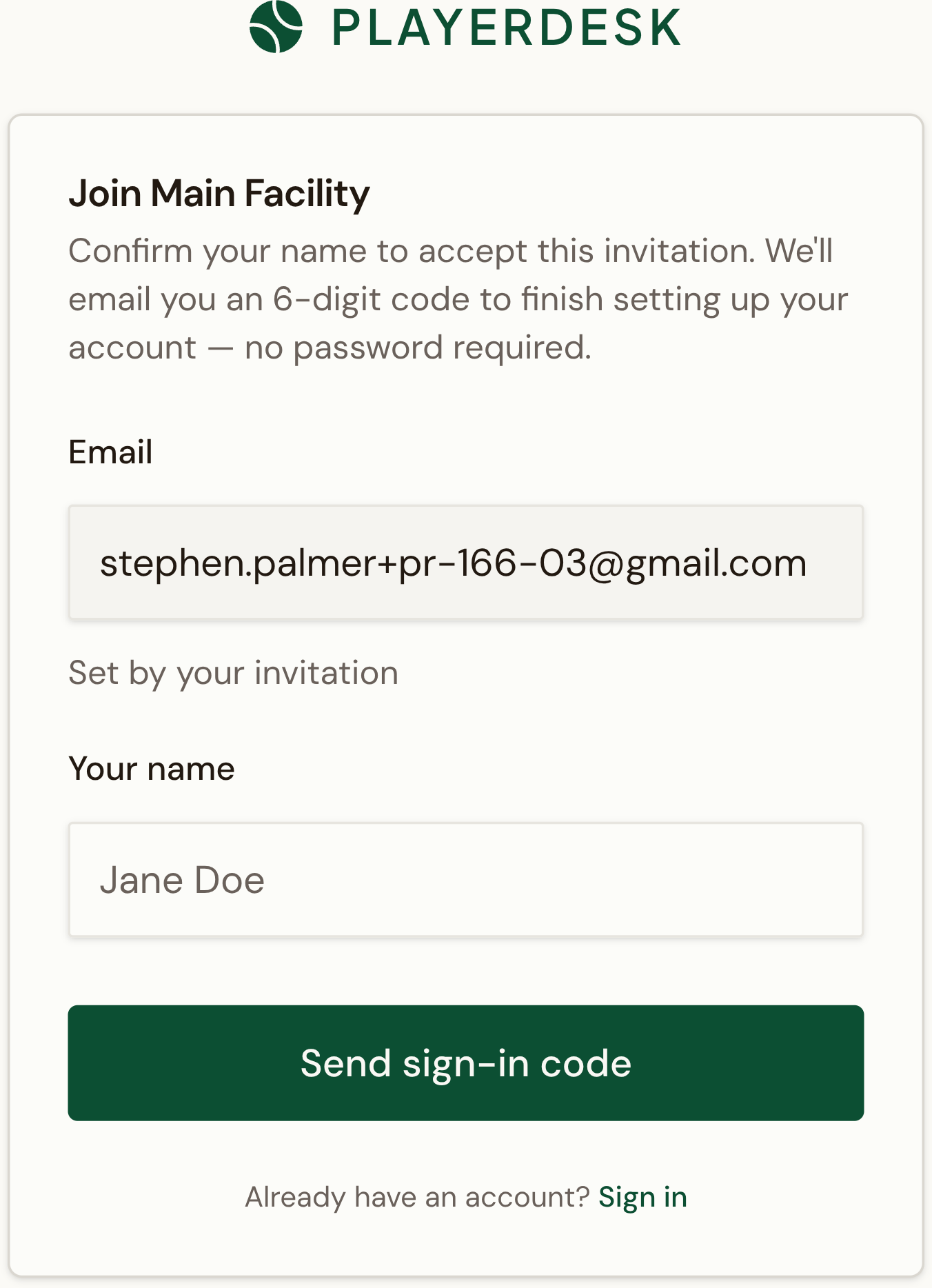
Invitation acceptance
The invited member starts from the email invitation acceptance flow.
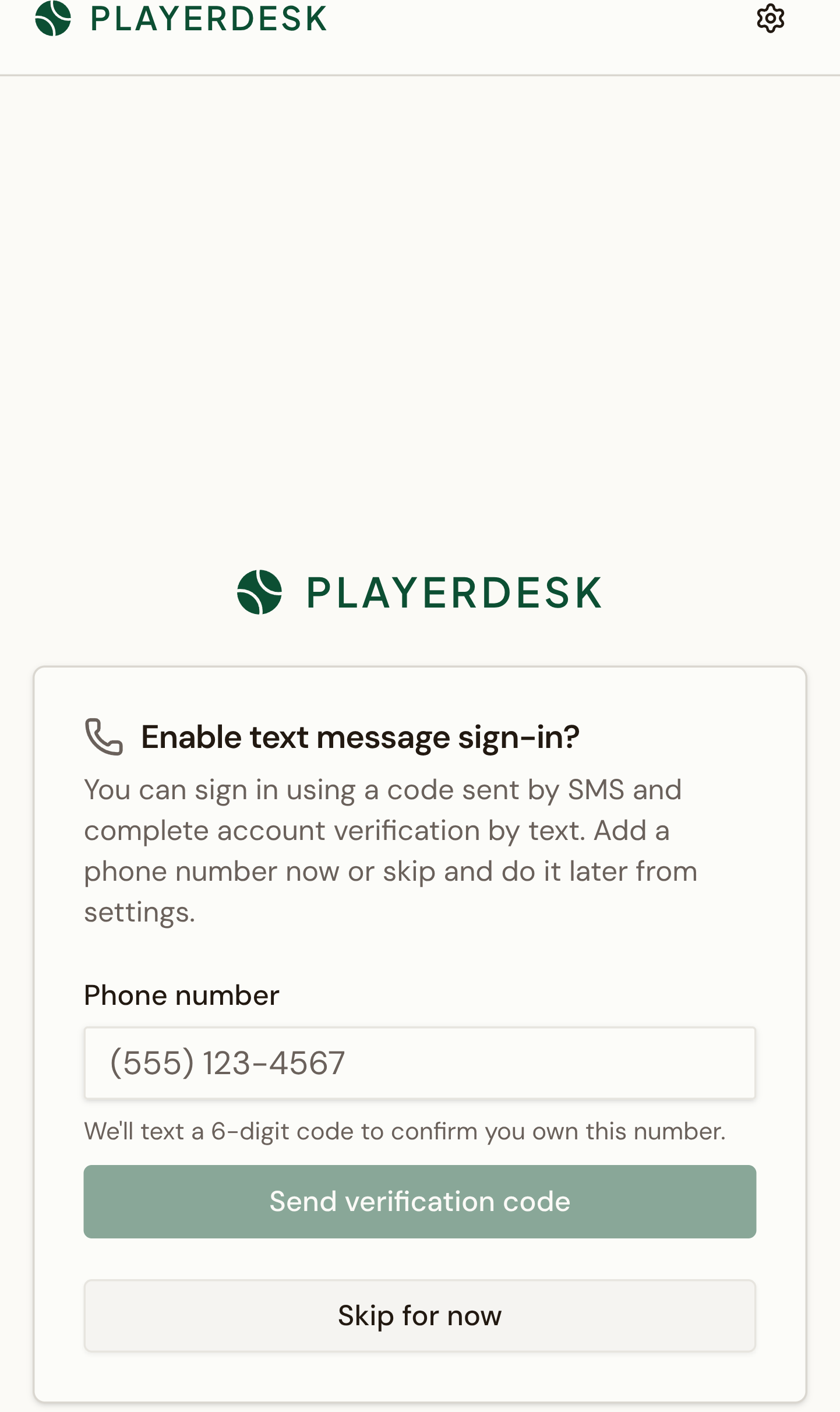
Phone entry
After invitation acceptance, the member can optionally add a mobile number for SMS sign-in.
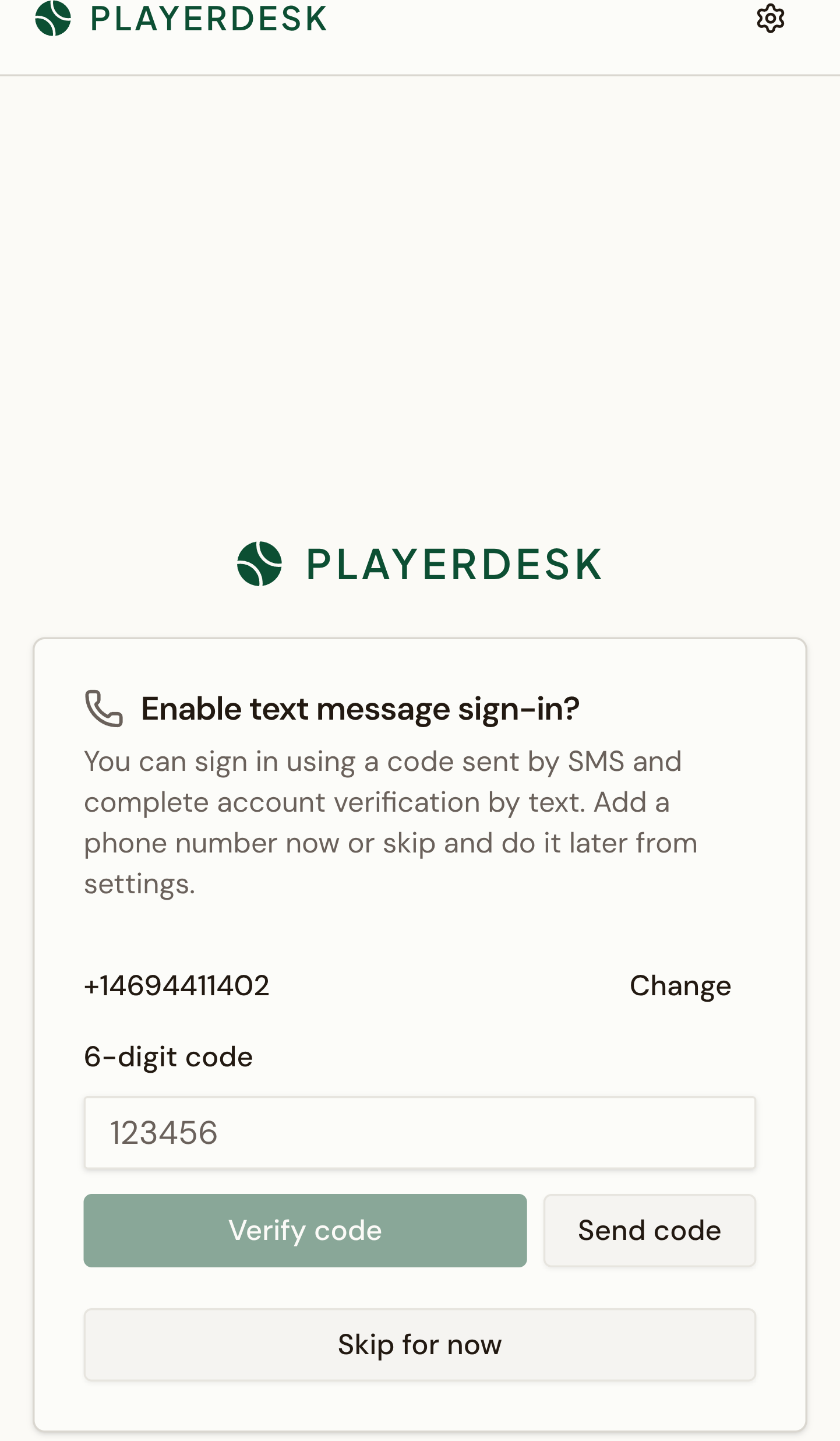
Phone verification
PlayerDesk sends a one-time phone verification code by SMS before the member can enroll.
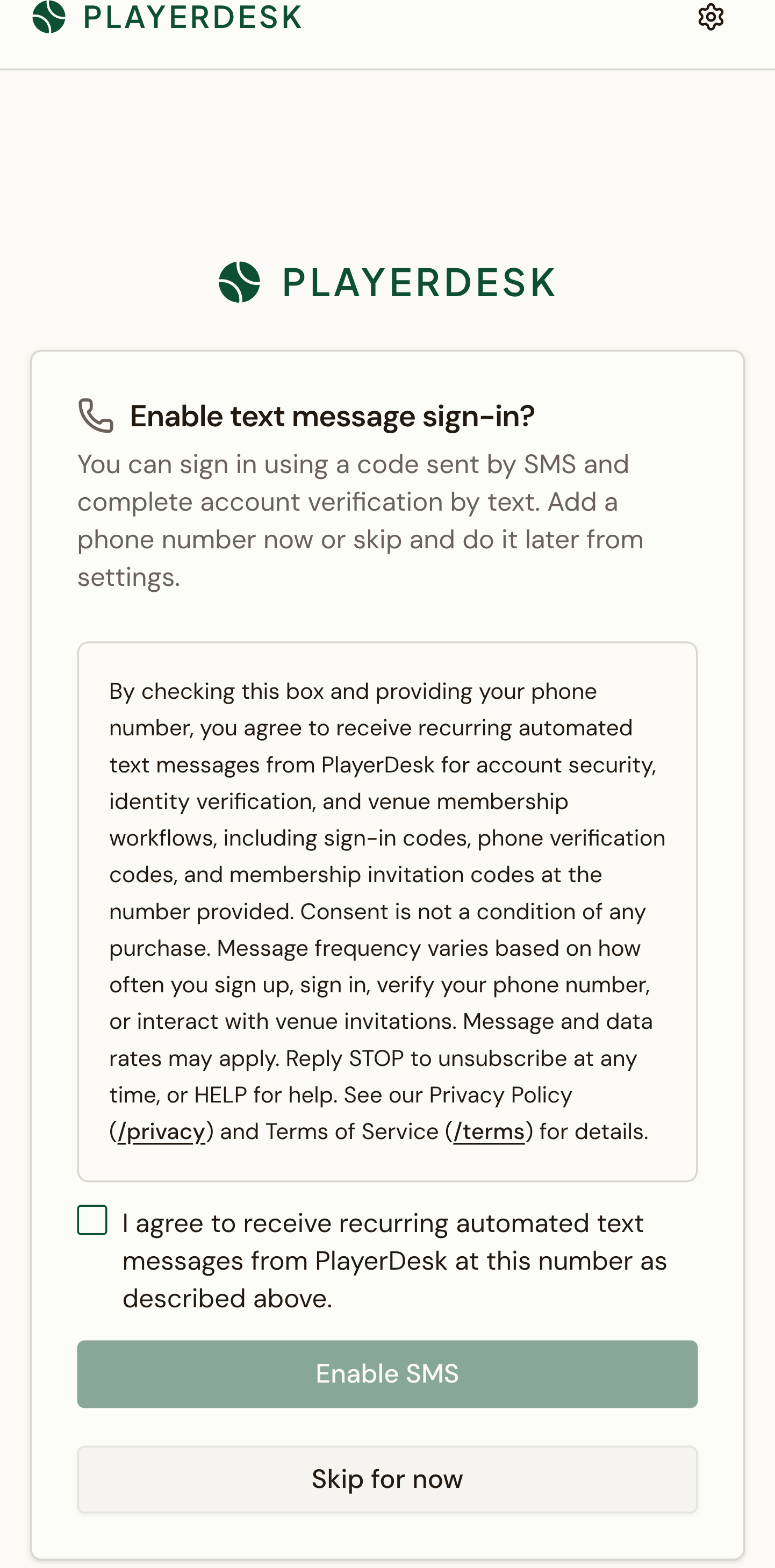
SMS consent
The full disclosure, Terms, and Privacy links are shown before the member can enable SMS.
- Step: The member enters a mobile phone number on the welcome screen.
- Step: PlayerDesk sends a one-time phone verification code by SMS.
- Step: The member enters the code to verify the phone number.
- Step: PlayerDesk shows the full SMS disclosure with links to the Privacy Policy and Terms of Service.
- Step: The member checks the consent box and taps Enable SMS.
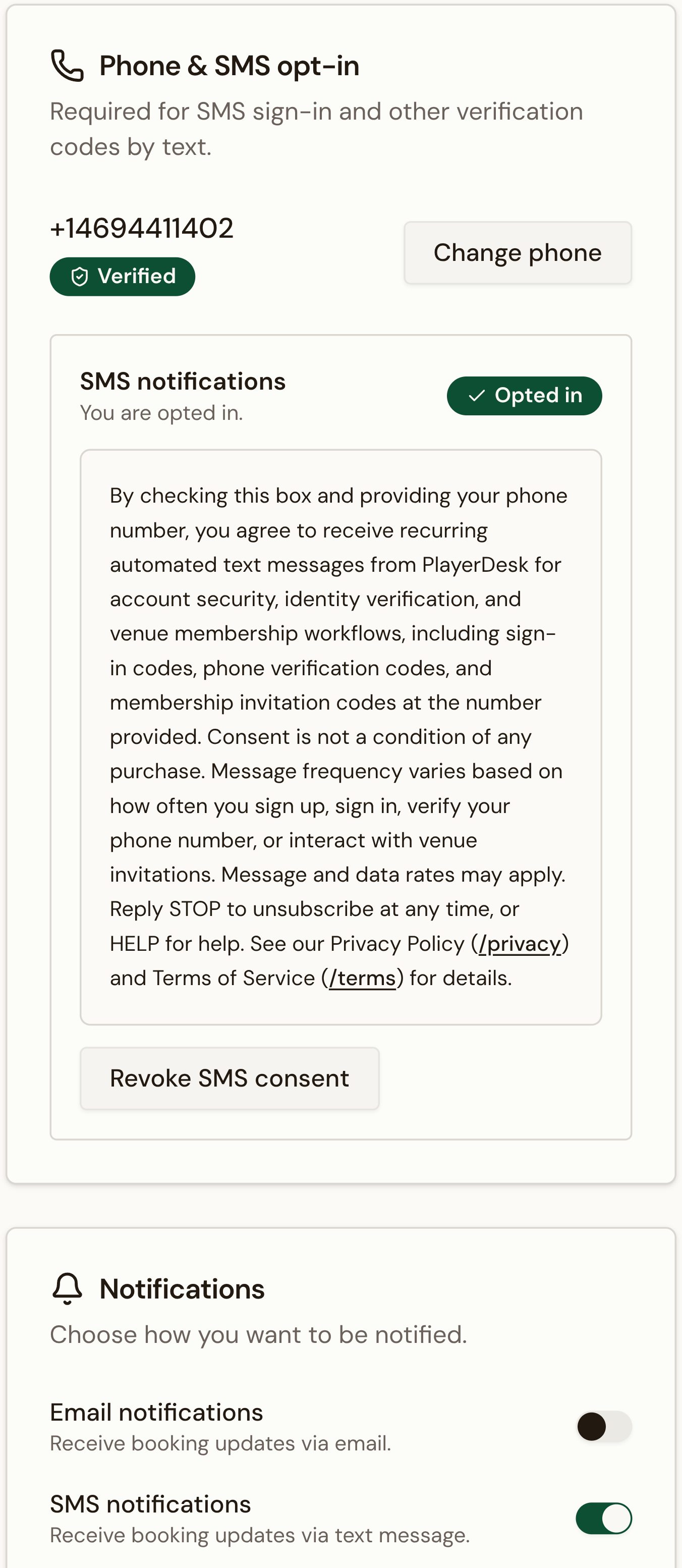
Member settings phone enrollment
Existing members can add a phone number in account settings, then confirm it with a one-time SMS verification code.
- Step: The member saves or updates a mobile phone number in settings.
- Step: PlayerDesk sends a one-time phone verification code by SMS.
- Step: The member enters the code to verify the phone number.
- Step: PlayerDesk shows the full SMS disclosure with links to the Privacy Policy and Terms of Service.
- Step: The member checks the consent box and taps Enable SMS.
Transactional Flows
Direct-request flows covered by this campaign
One-time SMS messages are sent only when a user directly requests or triggers a signup, login, SMS 2FA, or phone-verification flow in the product.
- The user enters a phone number and requests a signup code.
- PlayerDesk sends a one-time signup verification code by SMS.
- The member enters an email address or username and requests a one-time code on the login page.
- PlayerDesk always sends an email code. If the member is SMS-enrolled, PlayerDesk also sends a login code by SMS.
- The member can choose the SMS channel on the login page and submit that code to sign in.
- The member initiates SMS 2FA setup while signed in, or reaches an SMS 2FA challenge during login.
- PlayerDesk sends a one-time SMS 2FA code to the member's registered phone number.
- The user saves a phone number while signed in.
- The user taps Send code or Resend.
- PlayerDesk sends a one-time phone verification code by SMS.
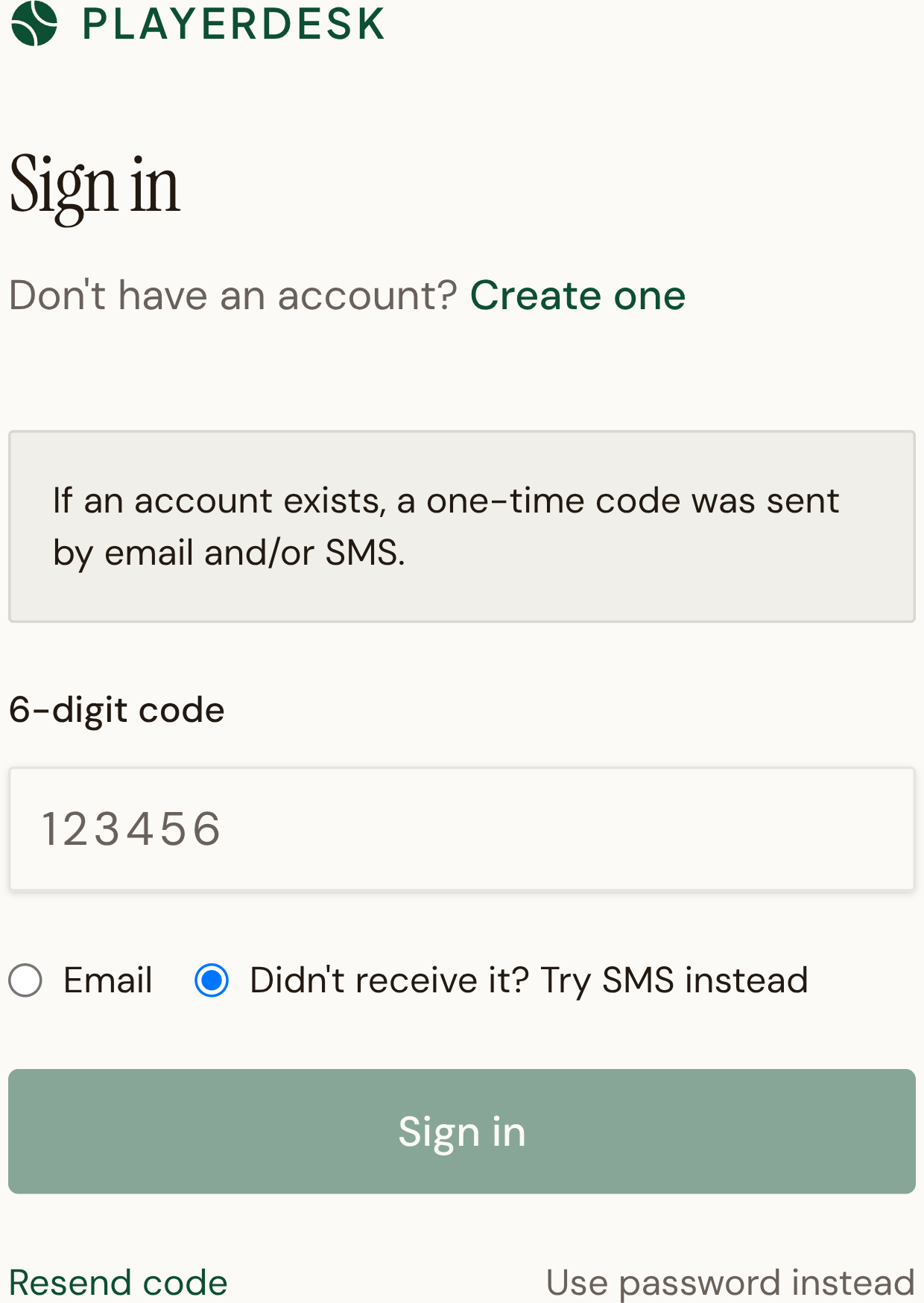
Login OTP screen with SMS option
Members who already verified a phone number and granted SMS consent can choose the SMS channel on the login OTP screen.
SMS login codes are sent only when the member already has a verified phone number and previously granted SMS consent on one of the recurring opt-in surfaces above.
The login page still shows the SMS option generically for anti-enumeration, but server-side verification fails closed when the member is not actually SMS-enrolled.
Live Copy
Exact sample messages
These are representative messages generated from the same code and templates used by the application.
Your PlayerDesk signup code is: 123456. This code expires in 10 min. Reply HELP for help, STOP to opt out.
Your PlayerDesk login code is: 123456. This code expires in 10 min. Reply HELP for help, STOP to opt out.
Your PlayerDesk 2FA code is: 123456. This code expires in 10 min. Reply HELP for help, STOP to opt out.
Your PlayerDesk phone verification code is: 123456. This code expires in 10 min. Reply HELP for help, STOP to opt out.
Reviewer Checklist
What this page proves
This section maps the public evidence back to the approval questions Twilio reviewers typically ask.