Twilio A2P / 10DLC evidence
Booking-notification SMS evidence — separate from the member auth program.
This page is a public reviewer walkthrough for the PlayerDesk Member Booking Notifications program. It documents the consent disclosure, opt-in surface, sample message bodies, and per-venue enrollment controls used by the booking-notification SMS campaign. The auth-program evidence lives at https://www.playerdesk.net/compliance/a2p-member-auth.
PlayerDesk is a DBA of Flying Banana Productions LLC.
Privacy Policy
https://www.playerdesk.net/privacyTerms of Service
https://www.playerdesk.net/termsUse case
LOW_VOLUME
Description
Flying Banana Productions LLC, which does business as PlayerDesk, sends low-volume service-related text messages to members who opt in to SMS booking notifications through our platform. Messages include booking confirmations, cancellations, booking updates, optional reminders sent before a reservation begins, and direct PlayerDesk links back to the member's authenticated venue page for booking management.
`message_flow`
Website-only first-time opt-in: an authenticated PlayerDesk member opens Account Settings after verifying a mobile phone number. Public evidence/screenshots: https://www.playerdesk.net/compliance/a2p-member-notifications. The opt-in screen displays the SMS disclosure with Privacy Policy (https://www.playerdesk.net/privacy) and Terms (https://www.playerdesk.net/terms) links. The unchecked checkbox label is "I agree to receive recurring automated booking-notification text messages from PlayerDesk at this number as described above." After checking it, the member taps "Enable booking SMS" to grant consent. No first-time keyword opt-in; START only re-enables after prior STOP. Separate from auth SMS; members may enroll in either, both, or neither. Messages may include direct, unshortened PlayerDesk links such as https://www.playerdesk.net/member/venues/[venueId]. Msg frequency varies. Msg & data rates may apply. Reply HELP for help or STOP to opt out.
`message_samples`
PlayerDesk: Your court is booked for Sat May 2, 9:00-10:00 AM at Downtown Club. Manage: https://www.playerdesk.net/member/venues/[venueId]. Reply HELP for help, STOP to opt out.
PlayerDesk: Your Sat May 2, 9:00 AM booking at Downtown Club was cancelled. Manage: https://www.playerdesk.net/member/venues/[venueId]. Reply HELP for help, STOP to opt out.
PlayerDesk: Your booking at Downtown Club was updated to Sat May 2, 9:30-10:30 AM. Manage: https://www.playerdesk.net/member/venues/[venueId]. Reply HELP for help, STOP to opt out.
PlayerDesk reminder: Your court at Downtown Club starts at 9:00 AM. Manage: https://www.playerdesk.net/member/venues/[venueId]. Reply HELP for help, STOP to opt out.
`opt_in_keywords` / `opt_in_message`
START
PlayerDesk: Booking SMS delivery is re-enabled for this number. Msg frequency varies. Msg & data rates may apply. Reply HELP for help, STOP to opt out.
`help_keywords` / `help_message`
HELP, INFO
PlayerDesk: Texts include booking confirmations, cancellations, booking updates, and reminders. Msg & data rates may apply. Reply STOP to opt out. Help: support@playerdesk.net.
`opt_out_keywords` / `opt_out_message`
OPTOUT, CANCEL, END, QUIT, UNSUBSCRIBE, REVOKE, STOP, STOPALL
PlayerDesk: You have successfully unsubscribed from booking-notification SMS and will no longer receive these messages from this number. Reply START to re-enable SMS.
Program
Program scope and required disclosures
These statements are the canonical compliance copy used across the website, legal pages, and member consent surfaces for the booking-notification campaign.
Message and data rates may apply.
Reply STOP to unsubscribe from booking notifications at any time. A one-time confirmation message may be sent after you opt out.
Reply HELP for help or contact support@playerdesk.net.
By checking this box, you agree to receive recurring automated text messages from PlayerDesk about your court reservations at this venue, including booking confirmations, cancellations, modifications, and reminders before your reservation. Consent is not a condition of any purchase. Message frequency varies by your booking activity at each venue and the venue’s reminder configuration (up to two reminders per booking). Message and data rates may apply. Reply STOP to unsubscribe from booking notifications at any time, or HELP for help. See our Privacy Policy (/privacy) and Terms of Service (/terms) for details.
Booking created notifications
Confirmation that a booking has been added to the member’s account.
Booking cancelled notifications
Confirmation that a booking has been cancelled.
Booking modified notifications
Confirmation that a booking’s time, court, or participants changed.
Booking reminder notifications
Up to two pre-reservation reminders, configured per venue.
Mobile numbers and SMS consent are not sold or shared with third parties or affiliates for marketing or promotional purposes.
PlayerDesk does not offer first-time booking-notification SMS enrollment by keyword. Members initially consent on the website in authenticated account settings after verifying a phone number. If a previously enrolled recipient later replies STOP, replying START may re-enable delivery for that number.
Booking-notification SMS messages are sent only after the member has a verified phone number and grants separate booking-notification SMS consent in account settings. Messages are tied to booking creation, cancellation, modification, or venue-configured reminders.
Support contact: support@playerdesk.net
Recurring Opt-In
Website flow where members consent to booking-notification SMS
The booking-notification program uses a single recurring opt-in surface inside member settings, distinct from the sign-in SMS opt-in path. Members can also manage per-venue enrollment overrides without changing the global consent state.
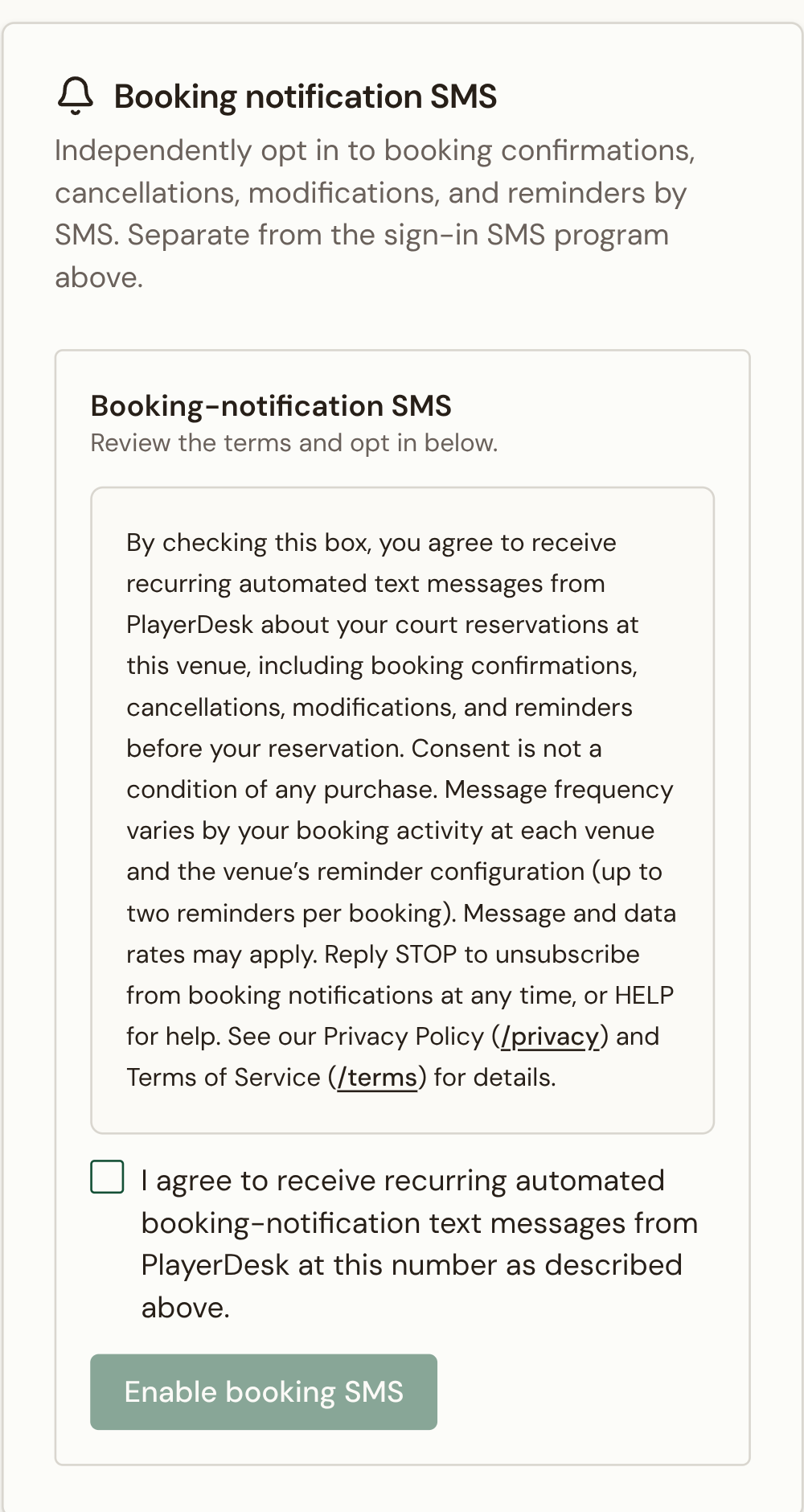
Booking SMS disclosure
Members opt in to booking-notification SMS from a dedicated section in account settings, separate from the sign-in SMS program.
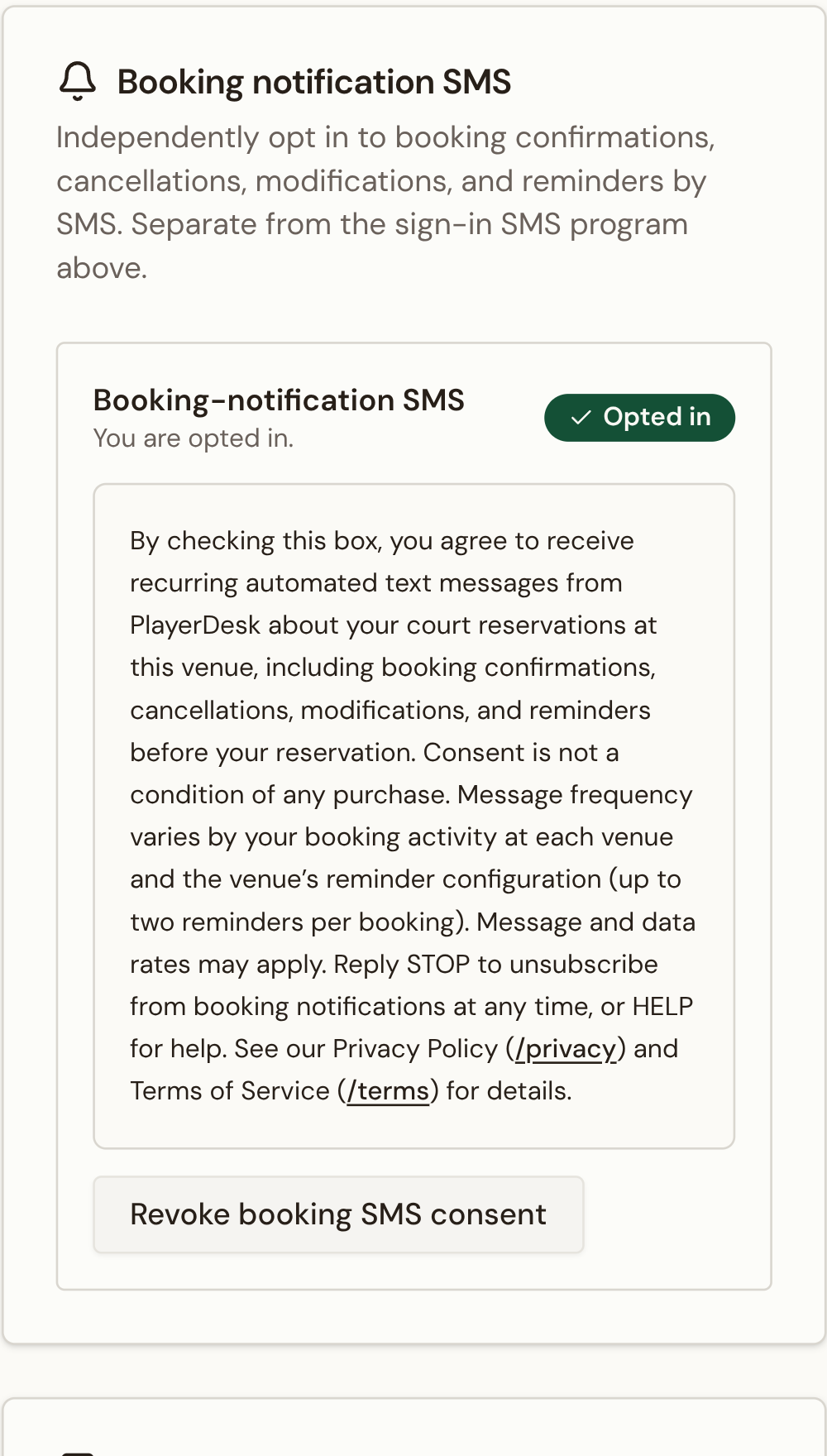
Post-grant state
After opt-in the section shows a clear "Opted in" badge and a one-click "Revoke booking SMS consent" control.
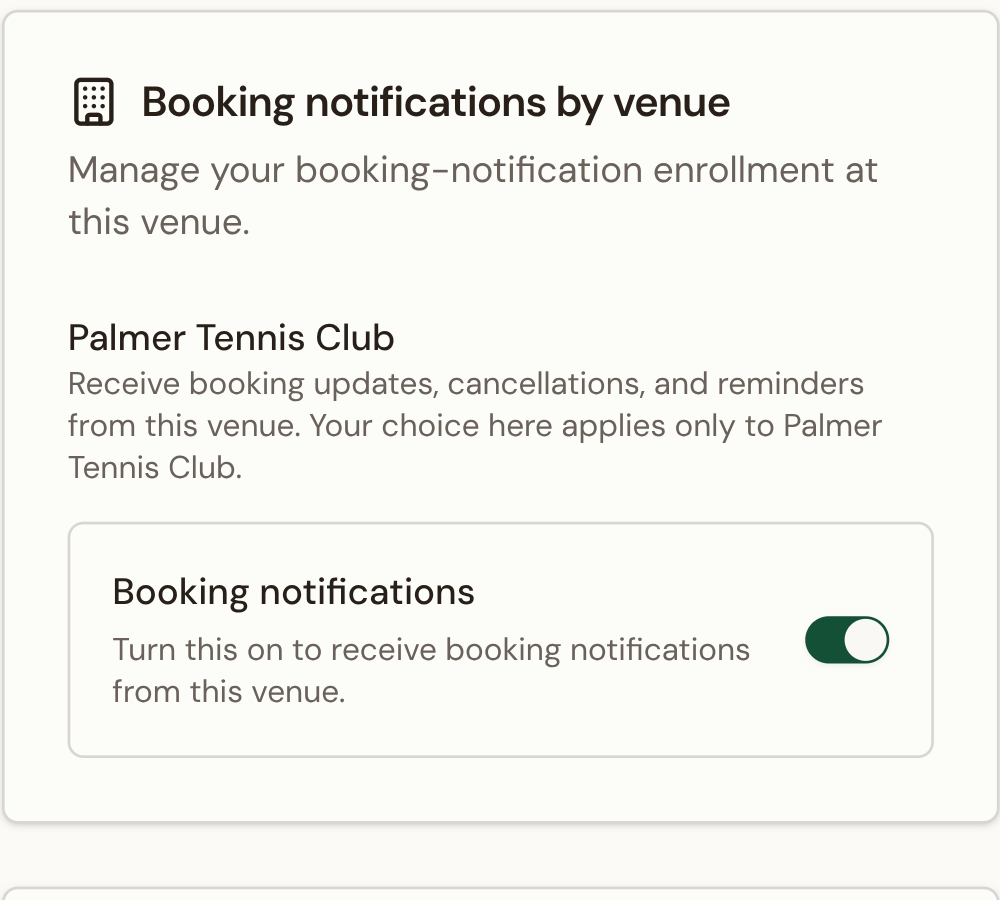
Per-venue enrollment
A dedicated card lets the member opt in or out of booking notifications for each venue independently of the venue rollout default.
- Step: The member opens member settings.
- Step: PlayerDesk shows the booking-notification SMS disclosure with links to the Privacy Policy and Terms of Service.
- Step: The member checks the consent box and taps Enable booking SMS.
Live Copy
Reviewer-ready sample messages
These sample bodies describe the exact message shape and required STOP / HELP footer used by the booking-notification campaign.
PlayerDesk: Your court is booked for Sat May 2, 9:00-10:00 AM at Downtown Club. Manage: https://www.playerdesk.net/member/venues/[venueId]. Reply HELP for help, STOP to opt out.
PlayerDesk: Your Sat May 2, 9:00 AM booking at Downtown Club was cancelled. Manage: https://www.playerdesk.net/member/venues/[venueId]. Reply HELP for help, STOP to opt out.
PlayerDesk: Your booking at Downtown Club was updated to Sat May 2, 9:30-10:30 AM. Manage: https://www.playerdesk.net/member/venues/[venueId]. Reply HELP for help, STOP to opt out.
PlayerDesk reminder: Your court at Downtown Club starts at 9:00 AM. Manage: https://www.playerdesk.net/member/venues/[venueId]. Reply HELP for help, STOP to opt out.
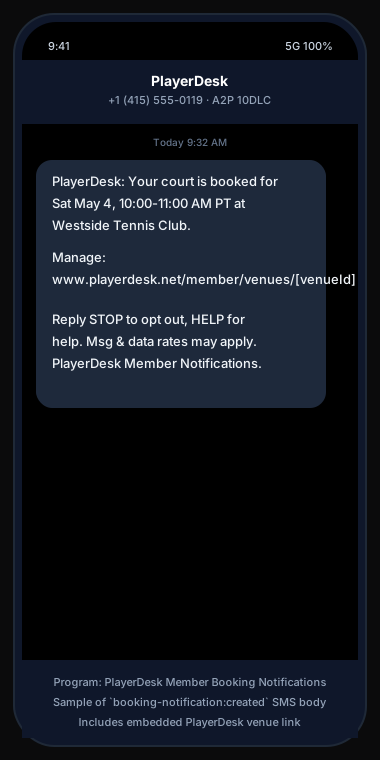
Booking created — sample SMS
Reviewer-ready visual of the booking-created SMS body, including the direct PlayerDesk venue link and the required STOP / HELP footer.
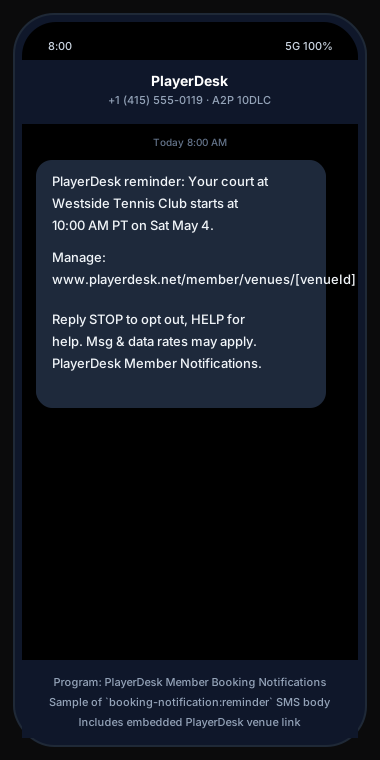
Booking reminder — sample SMS
Reviewer-ready visual of the booking-reminder SMS body, including the direct PlayerDesk venue link and the required STOP / HELP footer.
Reviewer Checklist
What this page proves
This section maps the public evidence back to the approval questions Twilio reviewers typically ask for the booking-notification program.